

Automatic account switching for Codex and Claude
Let Elyra switch to another Codex or Claude account when the current one reaches 96% of the limit, without interrupting what is already open.
AI-assisted translation · language: EN · source: pt-br/sistema/troca-automatica-de-contas.md · sourceHash: sha256:176df5a65ea7c9ad9ae87a9f531c721eecc5749e0661303305f7f0217b6c1460 · human review pending.
Anyone who uses Codex or Claude with more than one account knows the problem: the current account hits the limit in the middle of the work and you have to switch by hand. Automatic switching does it for you. When the account in use reaches 96% of the limit, Elyra moves to another account of yours that still has room.
It comes turned off and is per assistant: one switch for Claude and another for Codex.
How to turn it on
- Open Settings > Accounts.
- In the Claude or Codex block, turn on Switch account automatically.
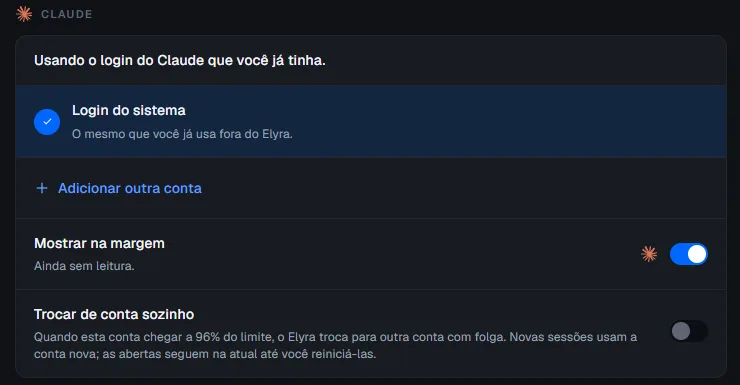
For the switch to have somewhere to go, the assistant needs at least two accounts added in Elyra (Add another account). The “system login”, the one you already use outside Elyra, does not take part in the switch: it goes from one account saved in Elyra to another.
When it switches
Elyra follows the consumption of the account in use, the same one shown in the margin meter, and acts when an observed window reaches 96%:
| Assistant | Observed windows |
|---|---|
| Claude | The 5-hour window and the weekly one |
| Codex | The weekly one |
Once past 85%, Elyra starts refreshing the reading more often, so it is not caught by surprise.
To choose the destination account, it considers only the other accounts that also have a recent reading (less than 30 minutes old) and are below 96% in every window. Among them, it picks:
- the one with the lowest usage;
- in a tie, the one that renews its limit earliest.
An account with no reading, or with an old reading, is never chosen: Elyra prefers not switching to switching blindly. Only accounts from the same environment as the current one count (those on Windows, or on the same WSL distro, according to Where the accounts live).
What you see
Every switch becomes a notice on screen, and so do the cases below where switching was not possible. If the other accounts do not have a recent usage reading yet, Elyra does not switch and does not notify: it waits for the next reading.
| Notice | When |
|---|---|
| “Switched from A to B (window at 96%). New sessions use B; open sessions stay on A until you restart them.” | The switch happened |
| “A reached 96% of the window and there is no other account to switch to.” | There is only one account, or no other has room and a recent reading |
| “All accounts reached 96% of the window. Nothing was switched.” | All of them are at the limit |
| “Could not switch the account automatically: reason. Switch in Settings.” | The switch failed: the account belongs to another environment, was removed, another switch was already in progress, or there was an unexpected error |
If the notice is born while Elyra is closed, it appears the next time you open it (for up to 24 hours).
What does not change
- Open sessions are not touched. The new account applies to the next sessions. An agent that is already running stays on the old account until you restart it. Elyra never interrupts an agent in the middle of its work.
- Once per window. After handling a window (by switching or by warning), Elyra does not repeat the notice or switch again in the same window. It becomes attentive again when the account’s usage drops below 85%, usually because the limit renewed. This avoids switching accounts in a loop.
- You are in charge. Switching the account by hand under Settings > Accounts keeps working; if you switch in the middle of a cycle, Elyra gives up and does not undo your choice.
- Turning it off stops it. With the switch off, Elyra neither switches nor warns.
Limits
- It depends on the consumption reading. Without a reading from the meter (“No reading yet”), there is no way to know the account reached the limit.
- Only between accounts saved in Elyra. It does not switch the system login.
- Only for new sessions. What is already open stays on the account it started with.