

Automation triggers
The five trigger types: schedule, Project Git, Elyra event, GitHub or GitLab and webhook, with the events and filters of each.
AI-assisted translation · language: EN · source: pt-br/fluxos/automacoes-gatilhos.md · sourceHash: sha256:6a4fbb51f866c2ad3820ebf2c52e5bef843c85a2966978a92c1cea93af16c890 · human review pending.
The trigger is the “when” of the automation. In the editor’s sentence, click when this happens and choose one of the five types.
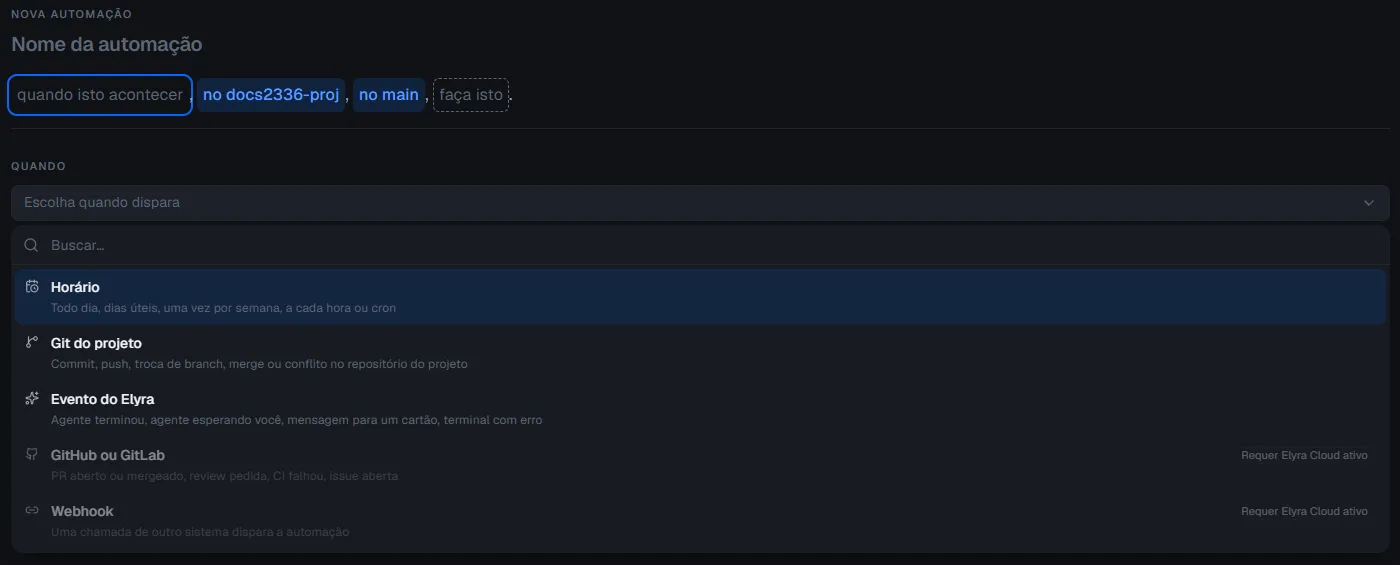
| Trigger | Fires when | Needs |
|---|---|---|
| Schedule | The scheduled time arrives | Elyra open |
| Project Git | There is a commit, push, branch switch, merge or conflict in the project’s repository | Elyra open |
| Elyra event | An agent finishes or waits for you, a message arrives for a card, or a command fails | Elyra open |
| GitHub or GitLab | A PR is opened or merged, a review is requested, CI fails or an issue is opened | Elyra Cloud active |
| Webhook | Another system makes a signed call to the automation’s URL | Elyra Cloud active |
The last two show as Requires Elyra Cloud active and stay unavailable while Cloud is not active on this computer.
Schedule
Choose the repetition:
| Form | Example | When to use |
|---|---|---|
| Every day | Every day at 9:00 | Almost always |
| Weekdays | Weekdays at 9:00 | Work routine |
| Weekly | Mondays at 9:00 | Once a week |
| Every hour | Every hour, at minute 30 | You choose the minute |
| Cron | 0 9 * * 1-5 |
A specific time |
Cron has five fields: minute, hour, day, month and day of the week. The editor tells you whether the expression is valid. The time zone is also chosen (by default, this computer’s): an “at 9” in the wrong time zone runs at the wrong time.
If Elyra is closed at the scheduled time, the run does not happen and is recorded in the history.
Project Git
Check one or more events:
| Event | When |
|---|---|
| commit | A new commit in the repository |
| push | The push is noticed when the remote branch advances; it is an approximation |
| branch switch | The branch in use changed |
| merge | There was a merge |
| conflict | A conflict appeared |
The Only on branch field narrows the trigger: empty, any branch counts; with a name, it only fires when the event happens with that branch in use.
Elyra watches the project’s repository, including over SSH, without installing anything in the .git
folder.
Elyra event
| Event | When |
|---|---|
| an agent finishes | An agent on one of the project’s cards finishes its work |
| an agent waits for you | An agent is waiting for an answer or a decision |
| a message arrives for a card | A message arrives for a card |
| a command fails or the terminal exits with an error | A terminal ends with an error |
| a board task is created | A new task is saved to the project’s work board |
| a task moves to a column | A task changes columns; choose the destination column in the editor |
Board events come from the successful mutation itself, without polling. The automation that made the change does not trigger itself; other automations can react, with the trigger limit guarding against cycles. From which card filters card events; the default is Any card in the project.
GitHub or GitLab
Give the provider, the repository in the form owner/name and the events:
| Event | GitHub | GitLab |
|---|---|---|
| PR opened | Pull request opened | Merge request opened |
| PR merged | Pull request closed as merged | Merge request merged |
| Review requested | Review requested on a pull request | No equivalent event |
| CI failed | Workflow run, check suite or check run that failed | Pipeline that failed |
| Issue opened | Issue opened | Issue opened |
After saving, open the automation’s details: the URL (Copy URL) and the secret are there, and you paste them into the provider. The walkthrough is in Webhook, GitHub and GitLab.
Webhook
A call from another system fires the automation. It also depends on Elyra Cloud, a URL and a secret. The
walkthrough, with curl, is in Webhook, GitHub and GitLab.
From the command line
The trigger goes in --trigger-json, a JSON object with the kind field:
kind |
Fields | Example |
|---|---|---|
schedule |
expression (cron or RRULE), timezone; optional dtstart |
{"kind":"schedule","timezone":"America/Sao_Paulo","expression":"0 22 * * *"} |
git-local |
repoId, events (commit, push, branch-change, merge, conflict), branch (optional) |
{"kind":"git-local","repoId":"my-project","events":["commit"]} |
elyra-event |
events (agent-finished, agent-waiting, card-message, terminal-error, work-item-created, work-item-moved), cardId (optional), columnId (required with work-item-moved) |
{"kind":"elyra-event","events":["work-item-moved"],"columnId":"done"} |
git-remote |
provider (github or gitlab), repo (owner/name), events (pr-opened, pr-merged, review-requested, ci-failed, issue-opened) |
{"kind":"git-remote","provider":"github","repo":"company/project","events":["pr-opened"]} |
webhook |
none | {"kind":"webhook"} |
- In a
scheduletrigger, the schedule fields come from the JSON itself; do not combine it with--trigger,--schedule,--time,--dayor--timezone. - For any other
kind,--trigger,--promptand--providerremain required: they are the text that old versions of Elyra read. - When editing with
elyra automations edit,--trigger-jsonreplaces the whole trigger.
Limits that apply to all
- One fire every 30 seconds, per automation. If the trigger fires again before that, the next run does not happen and is recorded in the history as “Not run: trigger limit”.
- Startup queue. If more than 50 events arrive while Elyra is starting, the extra ones are discarded and the history shows “Not run: event queue full”.
- No Cloud, no queue. If Cloud is off when GitHub, GitLab or the other system calls, it has to resend the call: Elyra does not keep a queue.