

Webhook, GitHub and GitLab
Fire an automation with a signed HTTP call: setup in the app and from the CLI, URL, secret, curl, GitHub, GitLab, responses and secret rotation.
AI-assisted translation · language: EN · source: pt-br/fluxos/automacoes-webhook.md · sourceHash: sha256:2b509d370ae030916e4236a4ad2ce8aa6870b5cae6dd61fadcc568b3030c71dc · human review pending.
A webhook lets another system fire an automation: GitHub when a PR is opened, GitLab when a pipeline
fails, your deploy script when it finishes. The source system makes an HTTP POST call to a URL of the
automation, signed with a secret that only you and Elyra know.
There are three ways to use it, and all three share the URL and the secret:
| Trigger | What for | How the call proves who it is |
|---|---|---|
| Webhook (generic) | Your scripts, your CI, any system | The X-Elyra-Signature-256 header |
| GitHub | Events from a GitHub repository | The X-Hub-Signature-256 header (GitHub’s standard) |
| GitLab | Events from a GitLab project | The X-Gitlab-Token header (GitLab’s standard) |
What has to be up
- Elyra Cloud active on this computer. Cloud is what receives the call coming from the internet. Without it, the GitHub or GitLab and Webhook triggers show as Requires Elyra Cloud active and cannot be chosen; from the CLI, the command refuses with “GitHub, GitLab, and webhook triggers require an active Elyra Cloud server.”
- The source system must be able to reach your Cloud’s address. The URL is public, in the form
https://<your-user>-cloud.elyra.sh/hooks/<automation-id>. - The system vault available. The secret is stored encrypted by the operating system’s keychain. If it is not available, Elyra refuses to create the secret and says why, instead of storing it unprotected.
If Cloud is off when the call arrives, Elyra keeps no queue: GitHub, GitLab or your system has to resend.
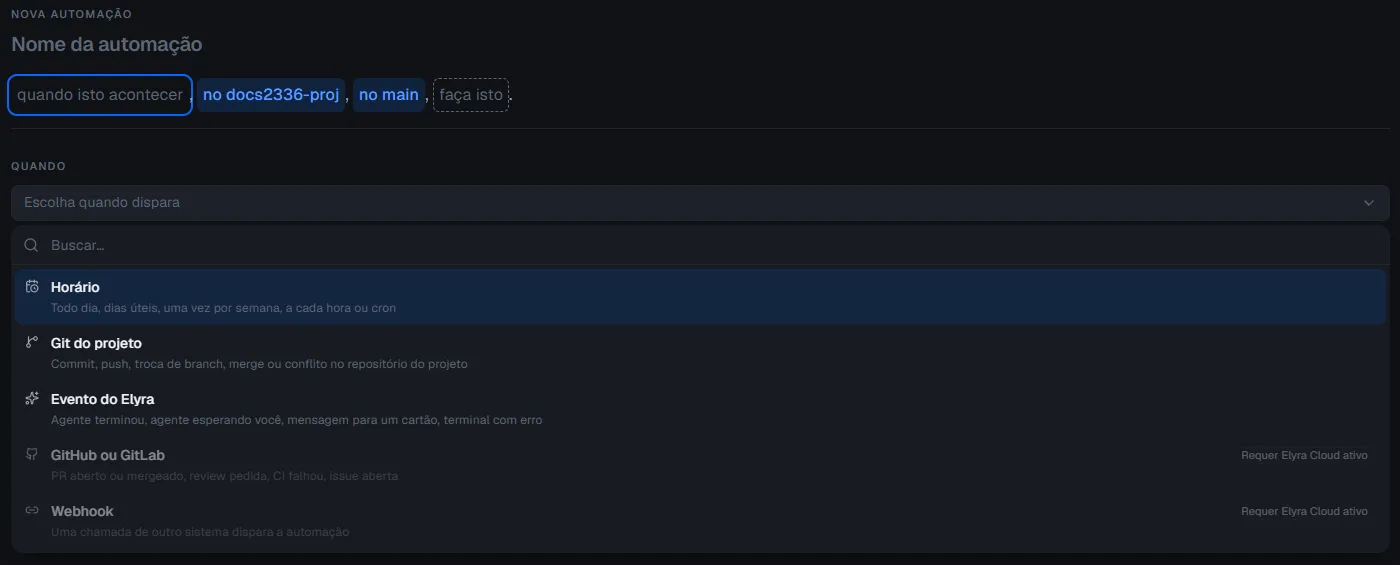
Setting it up in the app, step by step
- Open Automations > Create automation.
- Give it a name, for example “Notify when a deploy finishes”.
- Under when this happens, choose Webhook (or GitHub or GitLab, for the providers).
- For GitHub or GitLab: choose the provider, give the repository as
owner/name(for examplecompany/project) and check the events.
- For GitHub or GitLab: choose the provider, give the repository as
- Choose in (project), in (workspace) and the chain of actions under do this. See Actions.
- Create automation.
- Open the automation’s details. There you will find:
- Copy URL: the URL the source system will call;
- Copy secret: the secret, shown only once;
- Rotate secret and Revoke secret.
- Copy the secret right away and keep it in the source system. It is not shown again after you leave the screen. If you lost it, use Rotate secret to generate another.
- Paste the URL and the secret into the source system (see the sections below) and send a test.
When the event arrives, the run shows up in the automation’s History, with “fired because…”.
Setting it up from the CLI
The CLI creates the automation, generates the secret and prints the URL and the secret once.
The examples use single quotes, as in bash, zsh and Git Bash. In PowerShell and cmd, the inner quotes of the
JSON need escaping; if the command says the JSON is invalid, that is why.
Generic webhook
elyra automations create \ --name "Notify when a deploy finishes" \ --trigger daily --prompt "Deploy finished" --provider codex \ --repo my-project \ --trigger-json '{"kind":"webhook"}' \ --actions '[{"kind":"notify","title":"Deploy finished","body":"The deploy system said it finished"}]'The output includes, besides the automation summary:
Webhook URL: https://<your-user>-cloud.elyra.sh/hooks/<automation-id>Webhook secret (copy now): <secret shown only this time>--trigger, --prompt and --provider remain required even with --trigger-json: for triggers that are
not a schedule, they are the text that old versions of Elyra read. The chain that counts is the one in
--actions.
GitHub
elyra automations create \ --name "Review new PR" \ --trigger daily --prompt "Review PR" --provider codex \ --repo my-project \ --trigger-json '{"kind":"git-remote","provider":"github","repo":"company/project","events":["pr-opened"]}' \ --actions '[{"kind":"run-agent-in-workspace","prompt":"Review the PR that was just opened","agentId":"codex","workspaceMode":"new_per_run"}]'GitLab
elyra automations create \ --name "Investigate pipeline" \ --trigger daily --prompt "Investigate pipeline" --provider codex \ --repo my-project \ --trigger-json '{"kind":"git-remote","provider":"gitlab","repo":"group/project","events":["ci-failed"]}' \ --actions '[{"kind":"notify","title":"Pipeline failed","body":"Check GitLab"}]'The events accepted in git-remote are pr-opened, pr-merged, review-requested, ci-failed and
issue-opened. The repo must have the form owner/name. The fields of each action are in Actions.
Calling the generic webhook
The URL accepts POST only, with a JSON body (an object) of up to 1 MiB.
| Header | Value | Required |
|---|---|---|
X-Elyra-Signature-256 |
sha256= followed by the HMAC-SHA256, in hexadecimal, of the exact body, using the secret as the key |
Yes |
X-Elyra-Event |
Event name, only for the history. Without it, the body’s event field is used; without both, webhook |
No |
Content-Type |
application/json |
Recommended |
Example with curl, signing the body with openssl:
SECRET='paste-the-secret-here'BODY='{"event":"deploy-finished","title":"Deploy 42 finished","id":"42"}'SIGNATURE=$(printf '%s' "$BODY" | openssl dgst -sha256 -hmac "$SECRET" | sed 's/^.* //')
curl -i -X POST "https://<your-user>-cloud.elyra.sh/hooks/<automation-id>" \  -H "Content-Type: application/json" \  -H "X-Elyra-Event: deploy-finished" \  -H "X-Elyra-Signature-256: sha256=$SIGNATURE" \  --data-binary "$BODY"
Success response: 202, with no body. The automation runs afterwards.
Things that commonly go wrong:
- Sign the exact bytes you send. If you change a space or a line break after signing, the signature no
longer matches. That is why
--data-binaryand not-d. - Repeated calls with the same body are usually ignored. The generic webhook has no delivery
identifier, so Elyra uses the content of the body: the same body twice returns
202, but fires only once. This memory lasts up to 24 hours and is not a guarantee: it starts over when Elyra restarts and keeps a limited number of bodies. Include a field that changes on every call, such as an id or a timestamp, and do not rely on Elyra to block repeats. - What the automation sees. Elyra keeps only a summary of what arrived and never the whole body:
event, repository, title, URL, author and number, when the body carries
title,url,number, among others. That summary reaches the actions as untrusted external data: the agent is told not to follow instructions contained in it.
Setting it up on GitHub
In the repository, Settings > Webhooks > Add webhook:
- Payload URL: the URL copied from the automation’s details.
- Content type:
application/json. Any other format is not read. - Secret: the automation’s secret.
- Which events…: choose Let me select individual events and check the ones the automation uses: Pull requests (PR opened, PR merged, review requested), Workflow runs, Check suites or Check runs (CI failed) and Issues (issue opened).
- Add webhook.
Elyra checks GitHub’s signature (X-Hub-Signature-256) and uses the delivery header (X-GitHub-Delivery) so
that the same delivery does not fire twice.
| Automation event | What GitHub sends |
|---|---|
| PR opened | pull_request with action opened |
| PR merged | pull_request with action closed and the PR merged |
| Review requested | pull_request with action review_requested |
| CI failed | workflow_run, check_suite or check_run with conclusion failure |
| Issue opened | issues with action opened |
Setting it up on GitLab
In the project, Settings > Webhooks > Add new webhook:
- URL: the URL copied from the automation’s details.
- Secret token: the automation’s secret. GitLab sends it in the
X-Gitlab-Tokenheader. - Trigger: check Merge request events (PR opened and merged), Pipeline events (CI failed) and Issues events (issue opened).
- Add webhook.
GitLab has no “review requested” event equivalent, so that event does not fire there.
What Elyra answers
So as not to reveal whether an automation exists, almost every refusal returns 404, with no body.
| Response | When |
|---|---|
202 |
Accepted; or a repeated delivery; or a provider event that Elyra does not recognize (such as GitHub’s ping) |
404 |
A URL that does not exist or is malformed; an automation that is off, deleted or has its secret revoked; a signature that does not match; a body that is not a JSON object; GitHub or GitLab with an event the automation did not check or from another repository |
405 |
The method was not POST |
408 |
The body did not finish arriving within 10 seconds |
413 |
The body is over 1 MiB |
503 |
The automations service is not available yet |
If the automation is on and the signature does not match, Elyra records a “Not run” run with the reason “entrega recusada: assinatura inválida” (shown in Portuguese), at most one every 30 seconds. It is the sign that someone is calling with the wrong secret, or with an old one.
Rotating and revoking the secret
| I want to… | App | CLI |
|---|---|---|
| Generate another secret (and invalidate the previous one) | Automation details: Rotate secret | elyra automations webhook-secret rotate <id> |
| Invalidate the secret now, without generating another | Automation details: Revoke secret | elyra automations webhook-secret revoke <id> |
- Rotating prints the new URL and the new secret, once. The previous secret stops working immediately: update the source system right away.
- Revoking makes every new call be refused immediately. The history and the actions stay. To receive calls again, rotate the secret.
- The CLI answers “Webhook secret revoked.” or, when there was no active secret, “Webhook secret was not found or was already revoked.”
- The
<id>is the automation’s own (elyra automations list).
And the Cloud without a window?
Elyra Cloud is the app running on a server, without a window. A webhook call that reaches it runs the chain of actions the same way, with nobody in front of the screen. Two actions have nowhere to appear without a window and fail with a clear warning: Notification and Open a conversation. For these triggers, prefer actions such as Terminal command and Agent in a workspace.
Scope and limits
- The secret is the key to the door. Whoever has it fires the automation. Keep it like a password, never in a public repository, and rotate it if it leaks.
- One fire every 30 seconds, per automation. Calls closer together become “Not run: trigger limit”.
- No queue. Cloud off at the time of the call: whoever called has to resend.
- The body of the call is never stored. Only the summary described above.